Independent comparison · Updated August 21, 2026
The Best SVG Editors and Free Alternatives (Online & Desktop)
Looking for the best SVG editor—or a serious Boxy SVG alternative? This guide compares ten popular tools by what they actually do well: precision drawing, source-code control, collaboration, portability, export, and total cost.
Written for designers, developers, and teams choosing an SVG workflow—not just a feature-count ranking.

Need to inspect or rewrite SVG markup right now? SVGEditor is the best code-based SVG editor for developers: paste or upload a file, preview it live, and export to React or PNG in your browser.
Open the free SVG code editor →Quick picks: the right editor for the job
| Best for | Pick | Why it wins |
|---|---|---|
| Developers | SVGEditor | Code-first editing, live preview, React and PNG export, no install. |
| Free desktop design | Inkscape | Deep node, path, boolean, and illustration tooling at no license cost. |
| Boxy SVG alternative | SVGEditor or Inkscape | Choose SVG markup editing and speed online, or a full desktop canvas. |
| Quick browser drawing | Method Draw | Lightweight, open-source, and immediately usable in a browser. |
| Team interface design | Figma | Real-time collaboration, components, and handoff. |
| Mac-first vector design | Sketch | Excellent native interface design workflow on macOS. |
How we compare SVG editors
A vector editor is not automatically an SVG editor. The important question is what happens to the file after you draw. We evaluate six practical dimensions:
- Source fidelity: can you inspect, edit, and preserve the XML, viewBox, IDs, styles, and accessibility attributes?
- Drawing depth: are paths, nodes, booleans, gradients, masks, text, and filters first-class tools?
- Delivery: can you export clean SVG, raster formats, code, or design-system assets without surprises?
- Workflow fit: browser, desktop, operating system, offline use, collaboration, and team handoff.
- Cost and lock-in: licensing, account requirements, proprietary formats, and how easily you can leave.
- Maintenance: whether the output is practical to diff, sanitize, optimize, and ship.
Scores are intentionally qualitative. A tool can be excellent for illustration and still be a poor choice for editing production SVG source.
10 best SVG editors and alternatives in 2026
1. SVGEditor — best code-based SVG editor for developers
SVGEditor starts with the SVG source rather than hiding it behind a design abstraction. Paste or upload markup, see a live render, inspect errors, and export to React, React Native, PNG, or a Data URI. It is deliberately small: excellent for icons, UI assets, debugging, conversion, and quick edits—not a replacement for a full illustration suite.
Pros: free, browser-native, no account, source-first, shareable, developer-friendly exports, and useful for reviewing untrusted markup. Cons: it is not a node-heavy illustration app and does not try to be one.
2. Boxy SVG — polished SVG authoring
Boxy SVG is a focused vector editor with a clean interface and strong SVG awareness. It is a natural fit for users who want a dedicated SVG design surface without the breadth of a general-purpose Adobe workflow. If you searched for a Boxy SVG alternative, compare the reason you are leaving: SVGEditor is better for source inspection and code export; Inkscape is better for free desktop illustration.
Pros: focused UI, SVG-centric mental model, good everyday authoring. Cons: availability and pricing can matter, and developers may still want a separate source-level tool.
3. Inkscape — best free desktop SVG editor
Inkscape remains the benchmark for a free, open-source desktop vector editor. Its node editing, path operations, snapping, text, filters, and extensions make it the most capable no-cost choice for serious illustration and print-style work. Searchers looking for an Inkscape SVG editor should know the trade-off: power and offline control come with a larger application and a steeper learning curve.
Pros: powerful, open source, cross-platform, excellent path tooling. Cons: UI complexity, heavier workflow for tiny code edits, and SVG output may need cleanup for production.
4. Method Draw — best lightweight online drawing editor
Method Draw is a browser-based, open-source fork of SVG-Edit. It is useful when you need a quick canvas, basic shapes, text, paths, and direct SVG output without installing a desktop package. It is a good Method Draw SVG editor choice for simple diagrams and one-off assets, but it is not designed as a modern component pipeline or advanced code IDE.
Pros: fast, simple, open source, runs in the browser. Cons: limited depth, fewer developer exports, and less suitable for complex production assets.
5. Figma — best collaborative interface-design workflow
Figma is excellent when SVGs are part of a larger interface system: shared components, reviews, prototypes, and design handoff. It is not a source-first SVG editor, and exported markup can require optimization. Choose it for collaboration and product design, not because it gives the cleanest XML.
6. Adobe Illustrator — best professional illustration breadth
Illustrator is still a deep, mature choice for complex vector artwork, typography, print, and agency workflows. Its strength is the whole illustration system; its weakness for a developer is that the SVG is often the final export of a much richer document model.
7. Affinity Designer — best non-subscription desktop alternative
Affinity Designer offers serious vector and layout tooling with a strong desktop experience and a one-time-purchase model in many markets. It is compelling for designers who want professional drawing without Adobe’s subscription structure, but it is still a visual authoring tool rather than a code editor.
8. Vectr — approachable cross-platform vector editing
Vectr is designed to make basic vector work approachable across browser and desktop contexts. It can be a reasonable first tool for simple logos, shapes, and social graphics. Users searching for Vectr SVG should check current export and collaboration requirements before adopting it for a production asset pipeline.
9. Sketch — best Mac-first product-design workflow
Sketch remains a strong option for Mac-based product teams that value native performance, symbols, libraries, and handoff. It is a credible Sketch SVG editor choice inside a broader design workflow, but it is not the obvious answer for Windows users or developers who mainly need to edit SVG XML.
10. SVG-Edit — best open-source embedded editor foundation
SVG-Edit is valuable both as a lightweight editor and as an embeddable open-source project. It is worth considering when you need a browser canvas you can adapt. Expect more responsibility for integration, security, UX, and maintenance than with a hosted product.
Which SVG editor should you choose?
Start with the artifact you need to ship, not the brand you recognize:
Choose SVGEditor for source-level work
Use it when the SVG is code: icons, inline assets, React components, debugging, cleanup, conversion, or a quick review on a machine where you cannot install software.
Choose Inkscape for free desktop illustration
Use it when you need nodes, paths, snapping, booleans, filters, and offline work more than a minimal interface.
Choose Figma or Sketch for product teams
Use a design-system tool when collaboration, components, prototyping, and handoff are central to the job.
Choose Illustrator or Affinity for advanced artwork
Use a full vector suite when typography, print, complex composition, and mature illustration controls justify the extra weight.
A production SVG workflow that survives handoff
- Keep the
viewBoxstable and avoid unnecessary editor metadata. - Use meaningful IDs only when gradients, masks, or ARIA relationships require them.
- Inspect external references, scripts, event handlers, and embedded content before rendering untrusted files.
- Optimize only after visual comparison; aggressive cleanup can change text, filters, or geometry.
- For React, decide whether the asset belongs inline, in an
<img>, or as a CSS background. Our SVG-to-React guide covers that decision in detail.
SVG editor FAQ
What is the best free SVG editor?
For developer-oriented source editing, SVGEditor is the best fit. For free desktop illustration, choose Inkscape. For a lightweight browser canvas, Method Draw is often enough.
What is the best Boxy SVG alternative?
Use SVGEditor when you need SVG markup editing, live preview, and code exports. Use Inkscape when you need the broadest free desktop drawing toolkit. The “best” alternative depends on whether your bottleneck is markup or illustration.
Is an online SVG editor safe?
Safety depends on how input is handled. Prefer tools that keep files in the browser when possible, and sanitize untrusted SVG before embedding it into a page. Read our guide to SVG sanitization and XSS risk before rendering user uploads.
Can I convert SVG to React after editing?
Yes. Paste the final markup into the SVG to React converter to generate JSX, or use the React export in SVGEditor.
Still deciding? Test the developer workflow with a real file—no account or installation required.
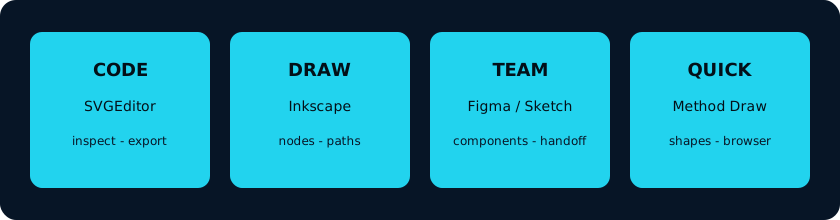
Try SVGEditor free →SVG editor workflow at a glance