Guide
How to Safely Sanitize SVG Uploads with DOMPurify
Learn how to sanitize SVG uploads before live preview, React insertion, download, or
sharing. This guide covers the real attack surface—foreignObject, SMIL
href tricks, nested data: URIs, DOMPurify, Next.js, XXE, and CSP. Written by
SVGEditor’s creator, it reflects a real client-side sanitizer rather than a regex checklist that only
looks safe on paper.
Published August 10, 2026 · Updated August 12, 2026

Paste a suspicious SVG into the editor. Active content is stripped before preview and before share-link encoding. Nothing leaves your browser.
Open SVGEditor (sanitized preview)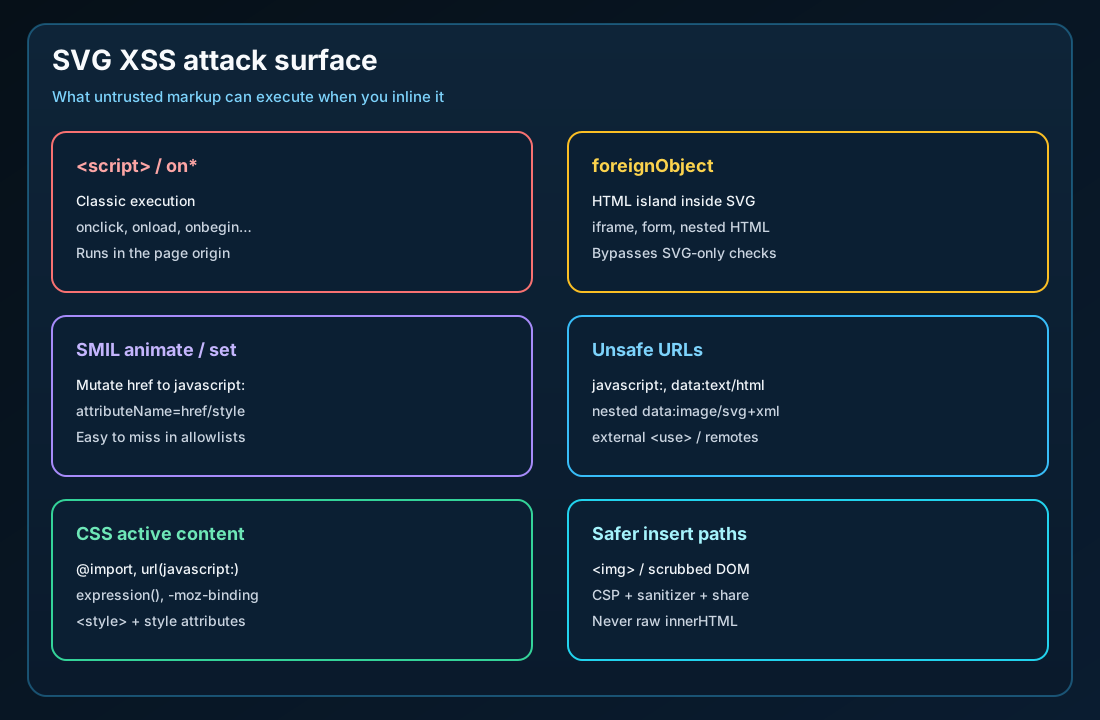
<script>.
Why you must sanitize SVG
SVG is not “just an image.” It is XML that can carry active content. Designers export harmless icons; attackers ship the same MIME type with a payload. The moment your app does something like this with user input, you inherit the same XSS risk as raw HTML on your origin:
// Hostile if `markup` came from an upload or paste
preview.innerHTML = markup;
// or
element.dangerouslySetInnerHTML({ __html: markup });
This risk appears in “logo upload” features, paste-to-preview editors, SVG sprites built from untrusted files, and share links that embed raw markup in the URL. A successful render is not a security signal.
Trusted design-system icons and hostile uploads need different pipelines. Mixing the two is how production incidents start.
SVG XSS attack surface (beyond <script>)
Stripping <script> alone is not sanitization. Modern payloads abuse several
surfaces at once:
| Surface | What goes wrong | Mitigation |
|---|---|---|
<script> |
Runs code in the page’s origin | Remove the element entirely |
on* handlers |
onload, onclick, onbegin, … |
Drop every attribute whose local name starts with on |
foreignObject |
HTML island: nested scriptable DOM, forms, iframes | Remove it (don’t empty it and leave the shell) |
SMIL (animate / set) |
Can rewrite href / style to javascript: |
Remove dangerous animations; never leave SMIL that can retarget URLs |
| URL attributes | javascript:, data:text/html, nested SVG data: |
Allowlist by element type and URL scheme |
| CSS | url(javascript:…), @import, legacy bindings |
Scrub <style> and style="" |
External <use> |
Pulls remote SVG into the document | Fragments only (#icon) for untrusted content |
feImage / filters |
Can reference remote or nested data: content |
Same URL policy as <image>; block nested SVG data |
This aligns with
OWASP ASVS 5.2.7: sanitize, disable, or sandbox user-supplied SVG — especially inline script and
foreignObject. CSP alone is not enough. SMIL is declarative animation, not
“script,” so a strict script-src will not stop an animate that rewrites
href.
Payload patterns you should test against
Use these snippets as hostile security-test fixtures, not as content to paste into production without a sanitizer. A solid pipeline must neutralize them before they reach the DOM.
1) Event handler on a shape
<svg xmlns="http://www.w3.org/2000/svg" viewBox="0 0 24 24">
  <circle cx="12" cy="12" r="10" onload="alert('xss')" />
</svg>
After sanitization: the onload attribute is gone. The circle may remain.
2) foreignObject HTML island
<svg xmlns="http://www.w3.org/2000/svg" viewBox="0 0 200 80">
  <foreignObject width="200" height="80">
    <body xmlns="http://www.w3.org/1999/xhtml">
      <script>alert("via foreignObject")</script>
    </body>
  </foreignObject>
</svg>
After sanitization: the entire foreignObject subtree is gone. “SVG-only” parsers that
ignore HTML-namespace children fail this case.
3) SMIL rewriting href to javascript:
<svg xmlns="http://www.w3.org/2000/svg" xmlns:xlink="http://www.w3.org/1999/xlink">
  <a xlink:href="#">
    <text y="20">Click me</text>
    <set attributeName="href" to="javascript:alert(1)" begin="0s" />
  </a>
</svg>
After sanitization: the dangerous set / animate is removed (or the whole
animation is dropped). Leaving SMIL that targets href, xlink:href, or
style is a classic incomplete allowlist.
4) Nested SVG / HTML in data: URLs
<svg xmlns="http://www.w3.org/2000/svg">
  <image href="data:image/svg+xml,<svg>…payload…</svg>" />
</svg>
Nested SVG inside a data: URL can smuggle scriptable content back in. A strict policy
allows common raster data URIs (image/png, jpeg,
webp, and similar) and blocks data:image/svg,
data:text/html, and data:application/*.
XXE, DOCTYPE, and non-browser XML parsers
Browser DOMParser with "image/svg+xml" behaves differently from a
server-side XML stack. On the server, disable DTDs and external entities before
you define tag allowlists. Billion-laughs and XXE-class bugs live in the parser configuration,
not in your script stripper.
- Reject or strip
DOCTYPEand entity declarations on upload - Disable external entity resolution in libxml, Xerces, or the XML library you use
- Cap input size and node count (zip bombs and pathological trees)
- Don’t “pretty-print” hostile XML through a second parser with looser settings
SVGEditor is browser-first: invalid markup fails closed on parsererror or a
non-svg root. If you store uploads on the server, apply both the XML-hardening
checklist and the SVG active-content checklist.
Defense-in-depth sanitization pipeline
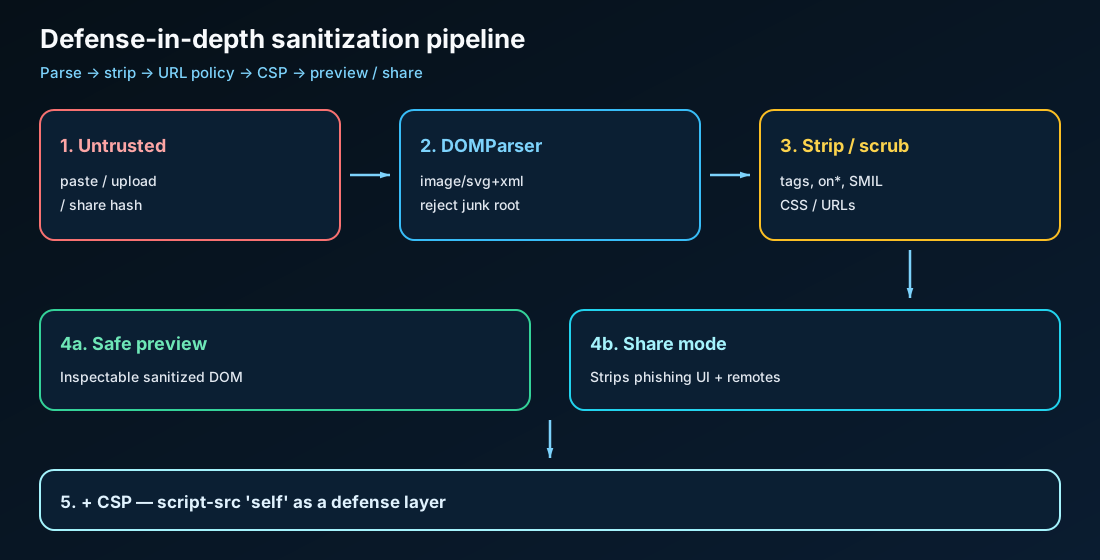
- Classify the source. A design-system file from CI ≠ a paste from the internet ≠ a share-hash payload.
-
Parse as SVG XML. Use
DOMParserwith"image/svg+xml", require a root<svg>, and rejectparsererror. - Strip active content deepest-first. Remove forbidden tags, event handlers, and hostile SMIL first, then scrub CSS and URL attributes.
-
Insert only cleaned markup under a CSP that does not trust inline script from
arbitrary strings. When you can, append a scrubbed DOM tree instead of assigning string
innerHTML.
Here is a simplified outline of a browser sanitizer. SVGEditor’s real module is stricter and share-aware:
function sanitizeSvgMarkup(markup, { share = false } = {}) {
  const doc = new DOMParser().parseFromString(markup, "image/svg+xml");
  if (doc.querySelector("parsererror")) throw new Error("Invalid SVG");
  const svg = doc.documentElement;
  if (svg.localName.toLowerCase() !== "svg") throw new Error("Root must be svg");

  // 1) remove script, foreignObject, iframe, …
  // 2) remove on* attributes
  // 3) drop SMIL that targets href/style or carries javascript:
  // 4) scrub <style> / style="" (block @import, url(javascript:), …)
  // 5) URL policy: fragments OK; raster data: OK; javascript: never
  // 6) if share: unwrap <a>, block remote images (anti-phishing UI)

  return new XMLSerializer().serializeToString(svg);
}
Safe insert paths: img vs inline vs sanitizer
| Insert path | XSS risk (untrusted) | Theming / DOM access | When to use |
|---|---|---|---|
Raw inline / innerHTML |
High | Full | Never for uploads |
| Sanitized inline DOM | Acceptable if well maintained | Full (after policy) | Editors, inspectable preview |
<img src="…svg"> |
Lower for script execution | Weak (currentColor won’t theme) |
Static logos, CMS figures |
CSS background-image |
Lower for script execution | Decoration only | Decorative only — never interactive UI |
| Trusted sprite / components | Low (if the supply chain is clean) | Strong | Design-system UI chrome |
Rule of thumb: trusted system icons can be inlined;
treat user SVG as hostile (sanitize it, use <img>, or both).
For embedding trade-offs beyond security, see
SVG → React and
SVG → PNG.
Share / embed mode: XSS is not the only threat
Product editors that encode SVG into a URL hash create a second problem: phishing UI. Even without script execution, a shared SVG can look like a login button that sends people off-site.
For that reason, SVGEditor’s share/embed path applies a stricter policy on top of the base sanitizer:
- Unwrap
<a>so fake CTAs cannot navigate away - Block remote
http(s)images and relative remote assets - Still allow local fragments (
#id) and safe rasterdata:image/*
Treat share URLs like the file itself. Confidential artwork does not belong in public channels — the payload sits in the hash on the recipient’s machine.
DOMPurify vs purpose-built SVG sanitizer
| Approach | Strengths | Caveats |
|---|---|---|
| DOMPurify (+ SVG config) | Battle-tested, widely reviewed, solid default | Enable SVG/Math carefully; keep the dependency updated |
| isomorphic-dompurify / server clean | Clean before storage; one policy for SSR | Sanitize again before any risky client insert |
| Purpose-built SVG sanitizer | SMIL, share mode, and editor UX tuned to your product | You own the tests and bypass research |
| Regex / string replace | None worth keeping | Easy to bypass via encoding, namespaces, SMIL, or CSS |
SVGEditor uses a purpose-built client sanitizer because preview, download, data
URI export, and share encoding all run in the browser under a known threat model. If you are
building a SaaS upload feature, DOMPurify (or an equivalent) plus server-side validation is often
the faster path — as long as SMIL and foreignObject are in your test suite.
DOMPurify SVG config (copy-paste starting point)
Use a maintained build of DOMPurify (Cure53). Pin the version, update on a schedule, and treat SVG bypass advisories as pager-worthy. Here is a starting point for untrusted uploads (tune it to your product):
import DOMPurify from "dompurify";

const CLEAN = DOMPurify.sanitize(dirtySvgString, {
  USE_PROFILES: { svg: true, svgFilters: true },
  // Prefer explicit forbids over hoping defaults never change:
  FORBID_TAGS: [
    "script",
    "foreignObject",
    "iframe",
    "object",
    "embed",
    "animate",
    "set",
    "animateTransform",
    "animateMotion",
    "handler",
    "listener",
  ],
  FORBID_ATTR: [], // still rely on DOMPurify's on* stripping; add extras if you allowlist attrs
  ADD_ATTR: [],    // do not casually ADD_ATTR for href without a URL policy
  KEEP_CONTENT: false,
});

// Second pass for share/preview phishing UI (product-specific):
// - unwrap or remove <a>
// - drop http(s) images / external use
// Or call your purpose-built SVG sanitizer here.
Common production gotchas:
-
Re-enabling
foreignObjectfor “HTML labels” reopens the entire HTML XSS surface — use a trusted-author tier instead. -
Forbidding the whole SMIL family is the blunt, safe default for uploads. If you must keep
decorative motion, allowlist only animations that cannot target
href/xlink:href/style, and still fuzzfrom/to/valuesforjavascript:. - On Node, use a maintained isomorphic wrapper and sanitize again before inserting into the browser DOM. This closes the stored-XSS gap created when content is cleaned only once, during upload.
How to sanitize SVG uploads in React and Next.js
The React footgun is simple:
// ❌ Never with user/upload markup
<div dangerouslySetInnerHTML={{ __html: uploadedSvg }} />

// ✅ Prefer safe preview for untrusted files
<img src={objectUrlOrHttps} alt="" />

// ✅ Or insert only after sanitize + parse
const clean = sanitizeSvg(uploadedSvg);
previewRef.current.replaceChildren(parseSvgElement(clean));| Layer | React SPA | Next.js |
|---|---|---|
| Upload API | Sanitize in the API / Worker before you store it | Route Handler / Server Action — same rule |
| Preview | <img> or scrubbed DOM |
Same; don’t stream raw SVG into RSC HTML |
| Icons in UI | Trusted SVGR / components only | Import from your design-system package |
| Export to JSX | Sanitize first, then convert | Same — see SVG → React guide |
If you need theming on a user asset, sanitize to a strict subset first, then wrap it as a component. Don’t “trust the designer’s export” just because the upload form has a file picker.
Browser quirks that break naive sanitizers
| Quirk | Why it matters | What to do |
|---|---|---|
| Namespaced event attrs | Handlers may show up with prefixes or odd casing | Strip by localName: anything matching /^on/i |
| SMIL vs CSP | script-src does not stop declarative animation |
Remove hostile SMIL in the sanitizer |
<img src="file.svg"> |
Scripts generally do not run; theming is lost | Good for static preview, not for icon systems |
| Inline SVG in HTML | Full active surface in the page origin | Highest-risk path — sanitize it or don’t inline it |
| Mutation after parse | Serialize-then-reparse can reshuffle edge cases | Sanitize → insert; avoid multi-hop reparse loops |
| Safari / Firefox gaps | Legacy URL / animation behavior differs at the edges | Fail closed; test payloads in at least two engines |
Regression tests every SVG sanitizer needs
Treat these as CI fixtures. After sanitization, assert that there is no script, no
on*, no leftover javascript:, and no foreignObject:
const FIXTURES = [
  ["onload-circle", `<svg><circle onload="alert(1)" /></svg>`],
  ["foreignObject-html", `<svg><foreignObject><script>alert(1)</script></foreignObject></svg>`],
  ["smil-href", `<svg><a href="#"><set attributeName="href" to="javascript:alert(1)" begin="0s"/></a></svg>`],
  ["data-svg", `<svg><image href="data:image/svg+xml,<svg><script>alert(1)</script></svg>" /></svg>`],
  ["css-js-url", `<svg><style>*{fill:url("javascript:alert(1)")}</style></svg>`],
  ["external-use", `<svg><use href="https://evil.example/x.svg#i" /></svg>`],
];

for (const [name, dirty] of FIXTURES) {
  const clean = sanitizeSvg(dirty);
  assert.ok(!/on\\w+\\s*=/i.test(clean), name);
  assert.ok(!/javascript:/i.test(clean), name);
  assert.ok(!/foreignObject/i.test(clean), name);
  assert.ok(!/<script/i.test(clean), name);
}
When you change the allowlist, add a fixture first. Sanitizer regressions stay quiet until someone pastes a proof of concept into production.
CSP: second line, not a substitute
A strict Content Security Policy (for example script-src 'self' without
'unsafe-inline') blocks many leftover script gadgets. It does not replace
markup sanitization:
- Some handlers and navigation tricks still enable product abuse
- Shared SVG can socially engineer clicks without running any script
- Future browser or library gaps should not be your only lock on the door
SVGEditor pairs page CSP with the sanitizer on purpose. That is defense in depth.
What breaks when you over-sanitize
-
External sprites:
<use href="/icons.svg#x">may be stripped for untrusted content — correct for uploads, painful for your own icon sheet. -
Remote illustrations:
<image href="https://cdn/…">is blocked in share mode by design. - Decorative SMIL / CSS motion: hostile animation targets must go; benign motion may be collateral damage if your policy is strict.
-
HTML labels in diagrams:
foreignObjectdiagrams will not survive a secure upload path — ask for a different format or a trusted-author exception.
Document two tiers: trusted authoring versus untrusted upload. Don’t silently “fix” files so they look like a successful brand asset that quietly lost its links.
Production checklist: sanitize SVG uploads
- Is the source classified (trusted system vs user vs share payload)?
- Do you parse with an XML SVG parser and reject non-
svgroots? -
Are forbidden tags removed (
script,foreignObject,iframe, forms, and similar)? - Are all
on*attributes removed (including namespaced forms)? - Is SMIL that targets
href/styleor carriesjavascript:dropped? - Is CSS scrubbed (
@import,url(javascript:), legacy bindings)? - Do you allowlist URLs by element type and block nested SVG
data:? - Is external
<use>disabled for untrusted content? - Does the share/embed path strip phishing UI (links, remote images)?
- Is CSP enabled as a second layer?
- Do automated tests cover foreignObject, SMIL, and nested data URI cases?
- Does invalid markup fail closed with a clear error?
How SVGEditor sanitizes in practice
Every paste, upload, download, data URI export, and share/embed encode path runs through the client sanitizer before the markup is trusted for preview or serialization. In short, it:
-
Removes executable / active tags (
script,foreignObject,iframe, form controls, and similar) - Strips event-handler attributes
- Removes SMIL that can retarget URLs or inject handlers
- Scrubs CSS text and
url()values -
Enforces a URL policy (blocks
javascript:, nested SVGdata:, and unsafe schemes) - In share mode, also unwraps anchors and blocks remote images so a hash link cannot pose as phishing UI
The sanitizer runs on-device; no server-side “virus scan” is involved. This is the same privacy model used for React and PNG export. Open the editor, paste markup, and inspect the preview. Active content should already be gone before you hit share or download.
FAQ
Why can SVG cause XSS?
SVG can include script, event handlers, HTML via foreignObject, SMIL that rewrites
URLs, and CSS payloads. Inline that into your page and it runs with your origin’s privileges.
Is <img> enough to sanitize SVG?
It lowers script-execution risk compared with raw inline markup, but it is not a complete policy, and it kills theming. Editors and upload features still need an explicit sanitizer before any DOM insert or share encoding.
What is foreignObject XSS?
foreignObject embeds HTML (or other namespaces) inside SVG. Attackers nest
scriptable HTML there to bypass naïve “SVG tag allowlists.”
Why is SMIL dangerous?
Animations can change href / style to javascript: after
your static attribute scan. Strip hostile SMIL — don’t stop at deleting
<script>.
Should I use DOMPurify?
Yes, for many apps — with an SVG-aware config and regression tests. SVGEditor uses a purpose-built sanitizer for preview and share UX, but the same standard applies: maintain it and test for bypasses.
Does SVGEditor sanitize in the browser?
Yes — before preview, download, data URI export, and share/embed. Share mode is stricter against phishing UI, and there is no server round-trip for cleaning.
Can CSP replace a sanitizer?
No. Use both. CSP catches missed script gadgets; the sanitizer decides what markup your product will accept in the first place.
What breaks if we over-sanitize?
External <use>, remote images, rich SMIL, and HTML-in-SVG diagrams. Split
trusted and untrusted pipelines, and fail closed with clear errors.
How do I sanitize SVG uploads in React or Next.js?
Never feed raw uploads to dangerouslySetInnerHTML. Sanitize in the API or Server
Action, store only cleaned markup, preview with <img> or scrubbed DOM, and keep
design-system icons on a trusted import path. See the
React / Next.js section above.
What is a good DOMPurify config for SVG?
Enable the SVG profile, forbid script, foreignObject, and hostile SMIL,
keep the library updated, and add fixtures for nested data: SVG. Copy the
starting config and tighten it for share mode.
Does OWASP require sanitizing user SVG?
Yes. ASVS 5.2.7 requires sanitizing, disabling, or sandboxing user-supplied SVG
scriptable content — and it calls out inline scripts and foreignObject explicitly.
References
- OWASP Application Security Verification Standard — requirement 5.2.7 (sanitize / sandbox user SVG).
- DOMPurify (Cure53) — maintained HTML/SVG sanitizer used widely in production.
- OWASP XSS Prevention Cheat Sheet — defense-in-depth context for insert paths and encoding.
Related guides
Convert SVG to React (JSX) — components and theming after the
markup is trustworthy.
Convert SVG to PNG — a raster export when the destination cannot
take vector (still sanitize first if the source was untrusted).
Try a sanitized preview now
Paste an SVG, confirm the live preview, then export React or PNG — or copy a share link. Active content is stripped client-side before those paths run. Free, no account required.